

I still remember the moment I realized my content strategy was basically a mess.
It was about three years ago, and I was sitting in a coffee shop reviewing our blog’s analytics. We’d published 87 articles on various aspects of digital marketing. Traffic was… okay. Rankings were scattered. But what really bothered me was watching our bounce rate hover around 68%. People would land on one article and leave. They weren’t exploring. They weren’t discovering our other content.
Then a colleague mentioned pillar pages, and honestly, my first reaction was eye-rolling. “Great, another SEO buzzword,” I thought. But after actually digging into the concept—and more importantly, after implementing it—I watched our organic traffic climb 55% over six months. Our bounce rate dropped to 42%. People were finally navigating through our content like we’d always hoped they would.
Here’s what I learned: pillar pages aren’t just another content trend. They’re a fundamental shift in how we organize and present information online. And if you’re publishing content without this structure, you’re probably leaving a lot of potential traffic and authority on the table.
In this guide, I’ll walk you through everything I’ve learned about pillar pages—what they are, why they matter, and when they make sense for your business. No fluff, just the practical insights I wish someone had shared with me three years ago.
So, what exactly are pillar pages?
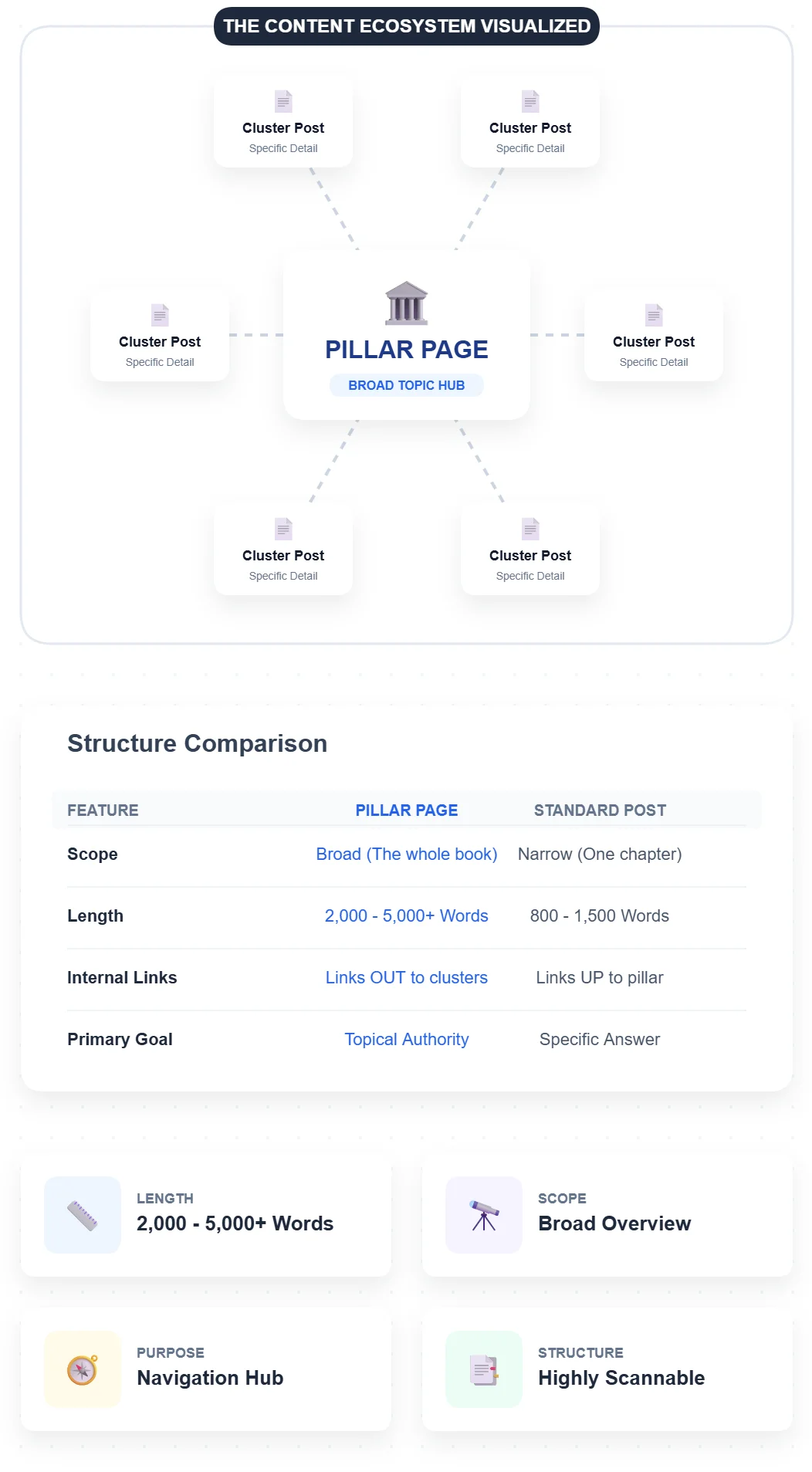
A pillar page is a comprehensive, standalone webpage that covers a broad topic in depth while serving as the central hub for related content. Think of it as the main chapter overview in a textbook, with links to more detailed sub-chapters.
Unlike a typical blog post that might explore one specific angle (like “how to write meta descriptions”), a pillar page tackles the entire subject (like “SEO basics”). It provides a high-level overview of everything within that topic, then links out to more detailed cluster articles that dive deep into each subtopic.
The magic happens in the structure: your pillar page sits at the center, linking to 5-15 cluster posts, and those cluster posts link back to the pillar. This creates a content ecosystem that search engines love and users find genuinely helpful.
Here’s what makes a pillar page different from a regular blog post:
– Length: Usually 2,000-5,000+ words of comprehensive coverage
– Scope: Broad topic overview rather than narrow focus
– Purpose: Acts as a navigation hub and authority signal
– Links: Extensively interlinked with related cluster content
– Structure: Highly scannable with clear sections and visual elements
When I built my first pillar page on email marketing, it covered the fundamentals, strategy, tools, metrics, and best practices—all at a high level. Then I linked to 12 existing blog posts that went deep on specific topics like subject line optimization, automation workflows, and deliverability. That one pillar page became our second-highest traffic source within four months.
How do pillar pages actually work in practice?
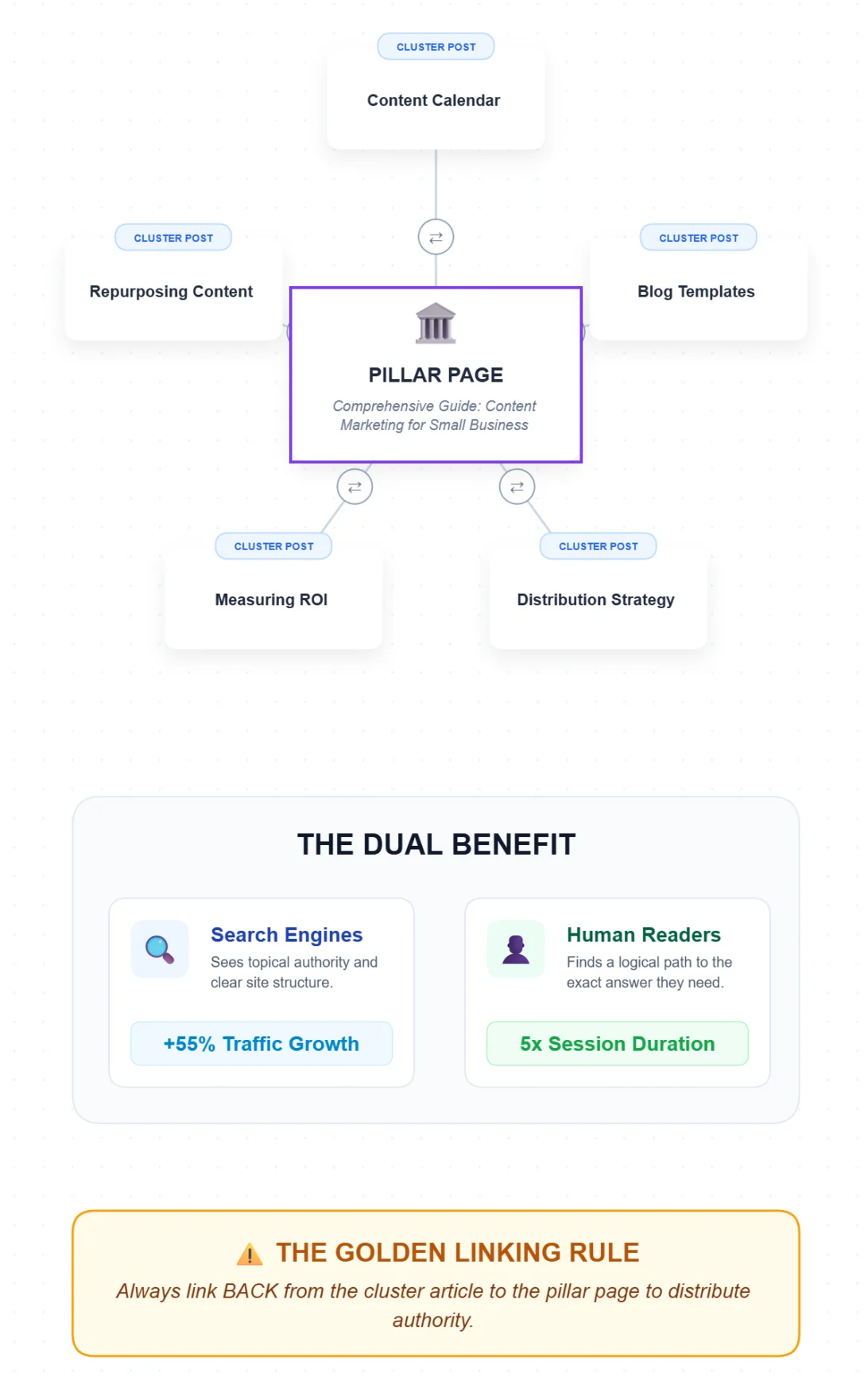
The pillar-cluster model is beautifully simple once you see it in action.
Start with your pillar page—let’s say it’s about “Content Marketing for Small Businesses.” This page gives readers a complete overview: what content marketing is, why it matters, the main strategies, common challenges, and how to get started. It’s comprehensive but not overwhelming.
Throughout this pillar page, you naturally link to your cluster articles:
– “How to create a content calendar”
– “Blog post templates that convert”
– “Content distribution strategies”
– “Measuring content ROI”
– “Repurposing content for social media”
Each cluster article dives deep into one specific aspect. And crucially, each one links back to your pillar page. This creates a web of internal links that accomplishes several things simultaneously.
For search engines, it signals topical authority. Google sees that you’ve covered a subject comprehensively, with depth and breadth. The internal linking structure makes it crystal clear how all these pieces relate to each other. According to Semrush’s 2024 analysis of 150,000 domains, sites using topic clusters see 55% more traffic after six months.
For users, it creates a logical learning path. Someone landing on your pillar page can quickly scan the overview, then click through to exactly the subtopic they need. Or they might land on a cluster article through search, find it helpful, then discover your pillar page and realize you’ve got comprehensive coverage of the entire subject.
I’ve watched this play out in our analytics countless times. Someone searches for “how to measure content ROI,” lands on our cluster article, spends three minutes reading it, then clicks to the pillar page, then explores two more cluster articles. Their session duration goes from three minutes to fifteen. That’s the power of good structure.
The bidirectional linking is essential. Pillar to cluster, cluster back to pillar. This distributes authority throughout your content ecosystem and prevents the dreaded content cannibalization where multiple pages compete for the same keywords.
What are the main benefits of pillar pages?

The benefits stack up in ways I didn’t fully appreciate until I’d been using pillar pages for about a year. Let me break down what actually matters.
For SEO and rankings:
Topical authority is the big one. Google’s algorithms have gotten sophisticated at understanding subject matter expertise. When you publish a comprehensive pillar with supporting clusters, you’re essentially saying “we’re experts on this entire topic, not just one narrow slice of it.”
This aligns perfectly with Google’s E-E-A-T framework (Experience, Expertise, Authoritativeness, Trustworthiness). A well-structured pillar demonstrates all four. Positional’s 2023 study https://www.positional.com/blog/pillar-page found that pillar-led strategies generated 40% more backlinks than scattered content approaches.
Internal linking becomes strategic rather than random. Instead of hoping you remember to link related posts, you’ve built a structure that naturally creates those connections. This improves crawlability—search engine bots can easily discover and index all your related content.
Featured snippet opportunities multiply. When you organize content logically, with clear questions and comprehensive answers, you’re more likely to capture those coveted position zero rankings.
For your users:
Navigation becomes intuitive. Readers can quickly assess whether you’ve covered what they need, then dive into specifics. No more bouncing around trying to find related information.
The learning experience improves dramatically. Someone new to a topic can start with your pillar’s overview, get oriented, then explore deeper. Someone more advanced can skip straight to the cluster articles they need.
Bounce rates drop and session duration increases. When people can easily find related content, they stick around. [Blue Compass reported](https://www.bluecompass.com/blog/pillar-pages-how-seo-topic-clusters-enhance-your-website) 2x session duration and 25% lower bounce rates from pillar implementations in their 2023 client data.
For your business:
Content compounds over time. Each new cluster article strengthens your pillar, and your pillar drives traffic to clusters. It’s a virtuous cycle.
Content planning becomes clearer. Once you’ve identified your pillar topics, you know exactly what cluster articles to create. No more staring at a blank content calendar wondering what to write.
Conversion paths strengthen. You can strategically place CTAs within your pillar and cluster content, guiding people naturally toward your product or service at the right moment in their journey.
You get better ROI from existing content. Those 50 blog posts you’ve already published? Organize them into pillar clusters and suddenly they work together instead of competing.
When should you invest in pillar pages?
Here’s where I need to be honest: pillar pages aren’t for everyone, and they’re not always the right starting point.
Pillar pages make sense when:
You’ve already published multiple articles on related topics. If you’ve got 15 posts about various aspects of social media marketing, you’re ready to organize them with a pillar page. The content ecosystem already exists—you’re just adding structure.
You’re targeting broad, competitive keywords. A pillar page gives you the comprehensive coverage needed to compete for terms like “email marketing” or “project management” that would be nearly impossible to rank for with a single blog post.
Your audience needs guidance through a complex topic. Some subjects require learning foundational concepts before diving into specifics. A pillar provides that roadmap.
You’re committed to long-term content authority. Pillar pages are strategic assets that require maintenance and expansion. If you’re thinking in months and years rather than days and weeks, they’re perfect.
You want to organize scattered content. I’ve worked with businesses that had 100+ blog posts with zero structure. Creating pillar pages gave their content library meaning and dramatically improved user experience.
Pillar pages might not be ideal when:
Your site is brand new with minimal content. If you’ve only published five blog posts, focus on creating more quality content first. You need the cluster articles before the pillar makes sense.
Your topics are extremely narrow. If your entire business focuses on one specific niche aspect of a subject, a pillar page might be overkill. Sometimes a series of detailed blog posts is more appropriate.
You’re chasing quick wins. Pillar pages are long-term plays. They take time to research, write, and optimize. If you need traffic this month, focus on easier opportunities first.
You can’t commit to maintenance. Pillar pages need periodic updates to stay relevant. If you publish once and forget, the content becomes outdated and loses effectiveness.
I learned this lesson the hard way. My first pillar page attempt was on a topic where we’d only published three related articles. It felt forced and thin. The pillar didn’t really serve a purpose because the ecosystem wasn’t there yet. Six months later, after publishing eight more cluster articles, I revisited it and everything clicked.
How pillar pages and content clusters work together
The pillar-cluster relationship is symbiotic, and understanding this dynamic is crucial.
Your pillar page is the overview—the 10,000-foot view of the entire topic. It answers the fundamental questions: What is this? Why does it matter? What are the main components? How do I get started?
Your cluster posts are the depth—the detailed guides that explore specific subtopics thoroughly. They answer the granular questions: How exactly do I do this specific thing? What are the advanced techniques? What mistakes should I avoid?
Think of it like a hub and spokes. The pillar is the hub, cluster articles are the spokes. Or like a table of contents: the pillar is the chapter overview, clusters are the individual sections.
The linking structure is intentional:
– Pillar links to relevant clusters at natural points in the content
– Clusters link back to the pillar (usually in the introduction or conclusion)
– Clusters can link to related clusters when relevant
– All links use descriptive anchor text that makes sense contextually
When I built our SEO pillar page, I linked to clusters on keyword research, on-page optimization, link building, and technical SEO. Each cluster article linked back to the pillar with anchor text like “our complete guide to SEO” or “learn more about SEO fundamentals.”
The result? Search engines understood the relationship between all these pages. Users could navigate logically. And we established clear topical authority on SEO as a subject.
One mistake I see constantly: creating a pillar page without the clusters, or creating cluster articles without ever building the pillar. Both scenarios miss the point. The power comes from the system, not the individual pieces.
What should a pillar page actually include?
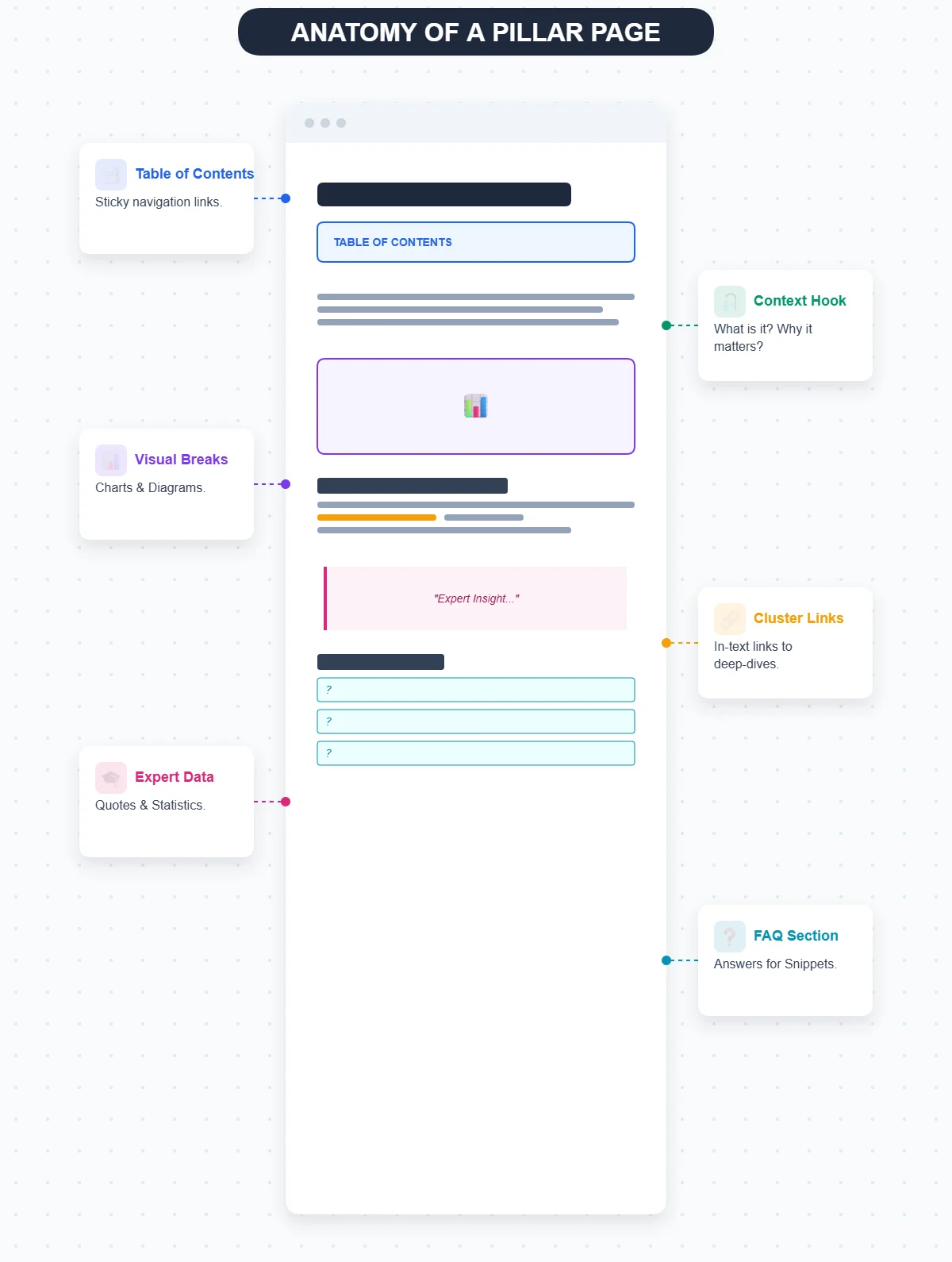
After building a dozen pillar pages, I’ve landed on a structure that consistently works.
Start with a table of contents. This serves dual purposes: it helps users jump to relevant sections, and it creates an organized outline that search engines appreciate. Make it clickable with anchor links.
Open with clear context. Explain what the topic is, why it matters, and what readers will learn. Set expectations immediately. I usually keep this to 2-3 paragraphs.
Break content into logical sections. Each major section should cover one aspect of the broad topic. Use clear H2 and H3 headings that include relevant keywords naturally.
Include visual elements. Charts, infographics, screenshots, and diagrams break up text and improve comprehension. Siteimprove’s 2024 report emphasizes that visual-rich pillar pages see significantly better engagement metrics.
Add expert insights and data. Statistics, research findings, and authoritative quotes build credibility. Always cite sources inline with proper links.
Link to cluster articles naturally. Don’t just dump a list of links at the end. Throughout your pillar content, when you mention a subtopic, link to the cluster article that covers it in depth.
Include FAQs. Address common questions directly and concisely. This helps with featured snippets and provides quick answers for readers scanning the content.
End with clear next steps. What should readers do with this information? Point them toward relevant cluster articles, tools, or resources.
Keep it scannable. Short paragraphs, bullet points, numbered lists, and white space make comprehensive content digestible. Nobody reads 3,000 words straight through—design for skimmers.
My email marketing pillar includes a table of contents, an introduction explaining why email still matters, sections on strategy, tools, metrics, best practices, and common mistakes, plus links to 11 cluster articles embedded naturally throughout. It’s 3,200 words but feels manageable because of the structure.
Common pillar page mistakes (and how to avoid them)
I’ve made most of these mistakes myself, so trust me when I say they’re worth avoiding.
Mistake #1: Creating a pillar without cluster content.
Your pillar page needs somewhere to link. If you don’t have supporting cluster articles, you’re building a hub with no spokes. Either write the clusters first or at least have a clear plan to create them within a few months.
Mistake #2: Treating length as the goal.
A 5,000-word pillar isn’t automatically better than a 2,500-word one. The goal is comprehensive coverage, not word count. I’ve seen thin, rambling 4,000-word pillars that added no value. Focus on thoroughness and clarity instead.
Mistake #3: Poor internal linking.
Random, forced links don’t help anyone. Link when it genuinely adds value for the reader. Use descriptive anchor text. Make sure cluster articles link back to the pillar. This seems obvious but I constantly see it done poorly.
Mistake #4: Ignoring mobile experience.
Over 60% of searches happen on mobile devices. If your pillar page isn’t mobile-friendly—with readable text, properly sized images, and easy navigation—you’re losing more than half your potential audience.
Mistake #5: Publishing and forgetting.
Topics evolve. Data changes. New subtopics emerge. Your pillar page needs periodic updates to stay relevant and maintain rankings. I review our pillar pages quarterly and update them at least annually.
Mistake #6: Keyword stuffing.
Yes, include relevant keywords naturally. No, don’t force your primary keyword into every heading and paragraph. Google’s algorithms are sophisticated enough to understand topic relevance without awkward repetition.
Mistake #7: No clear structure.
A pillar page that’s just one long wall of text fails regardless of quality. Use headings, subheadings, lists, and visual breaks to create scannable sections.
I learned the updating lesson the hard way. Our first pillar page on content marketing went nine months without updates. Rankings gradually declined. User engagement dropped. When I finally refreshed it with new data and examples, rankings recovered within three weeks.
Pillar pages and modern SEO: AI, featured snippets, and topical authority
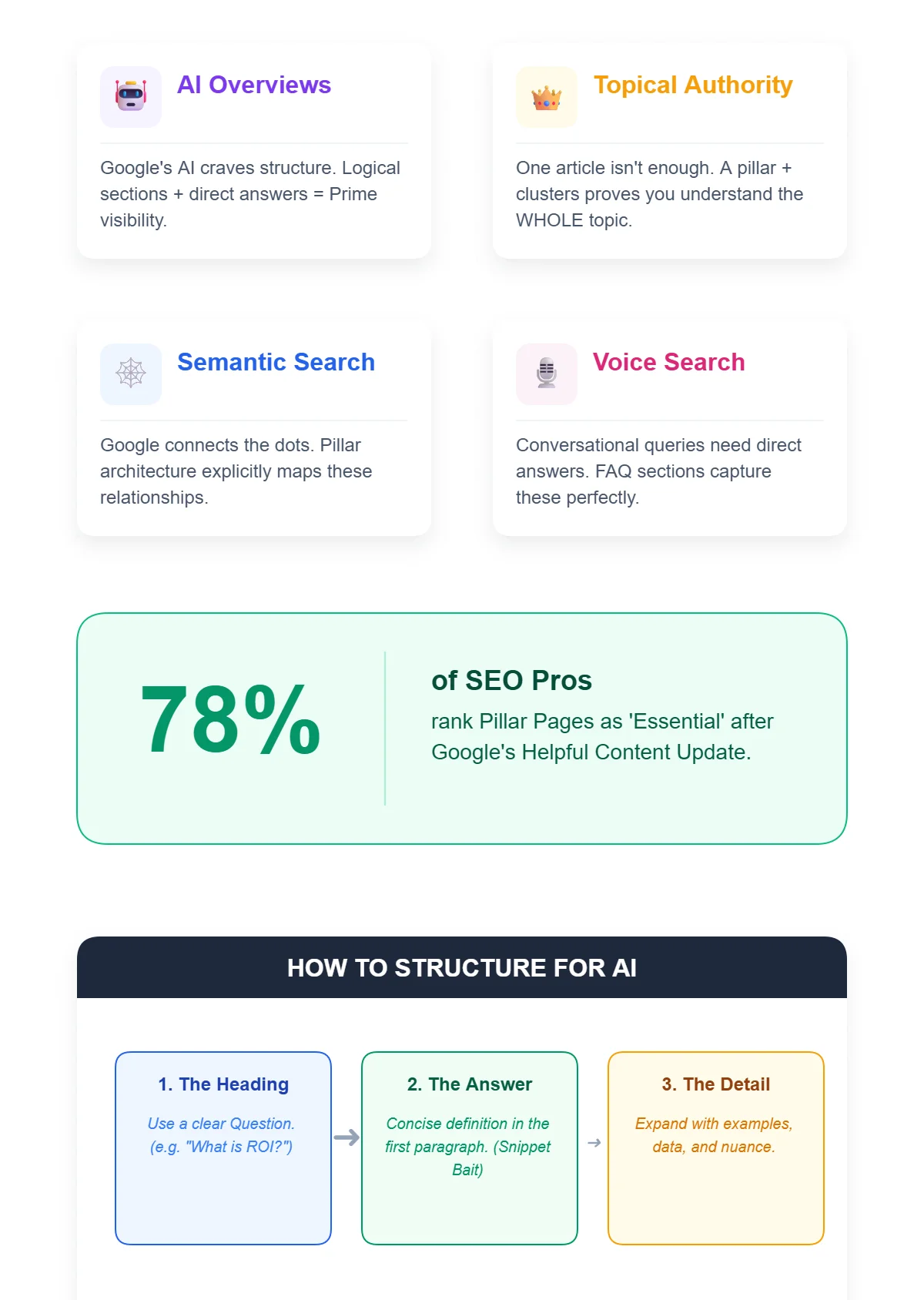
The SEO landscape has shifted dramatically, and pillar pages have become even more valuable.
Google’s AI Overviews and featured snippets prioritize comprehensive, well-structured content. When you organize information logically with clear sections and direct answers, you’re more likely to be selected for these prime positions.
Topical authority matters more than ever. Google doesn’t just want to see that you’ve written one good article on a subject—they want evidence that you understand the entire topic deeply. Pillar pages with supporting clusters provide exactly that evidence.
The rise of semantic search means Google understands relationships between topics and subtopics. When you explicitly structure those relationships through pillar-cluster architecture, you’re speaking Google’s language.
Voice search and conversational queries favor content that answers questions directly. Pillar pages, with their comprehensive overviews and FAQ sections, naturally align with how people actually search.
According to Nightwatch’s 2025 survey, 78% of SEO professionals rank pillar pages as “essential” following Google’s recent Helpful Content Updates. The algorithm increasingly rewards organized, user-focused content over scattered, keyword-focused articles.
Here’s what this means practically: structure your pillar pages with clear questions as headings, provide concise answers in the first paragraph of each section, then expand with details. This creates content that works for both traditional search results and AI-generated summaries.
Creating your first pillar page: a practical approach
If you’re ready to build a pillar page, here’s the process that’s worked for me.
Step 1: Choose your topic strategically.
Pick a broad subject central to your business that you’ve already written about multiple times. Don’t choose your entire industry—that’s too broad. Choose a major category within it.
Good examples: “Email Marketing,” “Project Management Tools,” “Content Strategy”
Too broad: “Marketing,” “Business Software,” “Communication”
Too narrow: “Subject Line A/B Testing,” “Gantt Charts,” “Blog Post Headlines”
Step 2: Audit your existing content.
List every article you’ve published related to this topic. You need at least 5-7 pieces to make a pillar worthwhile, ideally 10-15. These become your cluster articles.
Step 3: Identify content gaps.
What subtopics are missing? What questions haven’t you answered? Create a list of cluster articles you’ll need to write. This becomes your content calendar for the next few months.
Step 4: Outline your pillar structure.
What are the 5-8 main aspects of your topic? These become your H2 sections. Under each, what are the key points to cover? These become your H3 subheadings.
Step 5: Write for comprehension, not length.
Explain each major aspect clearly and thoroughly. Link to cluster articles where readers can go deeper. Include examples, data, and visual elements. Keep paragraphs short and scannable.
Step 6: Optimize naturally.
Include your primary keyword in the H1, first paragraph, and a few section headings. Use related keywords and synonyms throughout. But prioritize readability over keyword density.
Step 7: Add internal links strategically.
Link to your cluster articles at natural points throughout the content. Make sure those cluster articles link back to your pillar. Check that all links work and use descriptive anchor text.
Step 8: Create supporting elements.
Add a table of contents, relevant images with proper alt text, and an FAQ section. Include author credentials if relevant. Make sure the page loads quickly and looks good on mobile.
Step 9: Publish and promote.
Share your pillar page through your usual channels. Update older cluster articles to link to the new pillar. Consider it a major content asset worth promoting.
Step 10: Monitor and maintain.
Track rankings, traffic, and engagement metrics. Update the content quarterly with new data, examples, or insights. Add new cluster articles over time and link them from the pillar.
Tools like ButterBlogs can help streamline the research and drafting process, especially if you’re building multiple pillar pages or managing content for clients. The platform helps identify pillar-worthy topics, plan clusters, and structure long-form content efficiently—basically automating the 80% of work that’s research and organization, leaving you to focus on the 20% that requires your expertise.
FAQ: Your pillar page questions answered
What’s the ideal length for a pillar page?
There’s no magic number, but most effective pillar pages fall between 2,000-5,000 words. Focus on comprehensive coverage rather than hitting a specific word count. I’ve seen excellent 2,200-word pillars and mediocre 4,500-word ones. Quality and completeness matter more than length.
How many cluster articles do I need per pillar?
Aim for 5-15 cluster articles, depending on topic complexity. Too few and you don’t have a real ecosystem. Too many and the pillar becomes unwieldy. Start with what you have, then expand over time as you create more content.
Can I create a pillar page for a new site with limited content?
You can, but I’d recommend building some cluster articles first. A pillar page without supporting content feels hollow and doesn’t provide the SEO benefits you’re hoping for. Focus on creating 8-10 quality cluster articles, then build the pillar to organize them.
How often should I update my pillar pages?
Review quarterly, update at least annually. Add new statistics, refresh examples, incorporate new subtopics, and ensure all links work. Outdated pillar pages lose credibility and rankings quickly in competitive topics.
Do pillar pages work for local businesses?
Absolutely. A local HVAC company could create a pillar on “Home Heating and Cooling” with clusters on furnace maintenance, AC repair, energy efficiency, and seasonal tips. Local businesses often have deep expertise that translates perfectly into pillar-cluster structures.
Should I gate my pillar pages to capture leads?
I generally recommend against it. The SEO value comes from the page being publicly accessible and linkable. Consider gating a related resource (like a detailed template or checklist) instead, promoted within your pillar page.
How do pillar pages differ from ultimate guides?
They’re similar but not identical. Ultimate guides are comprehensive standalone pieces. Pillar pages are specifically designed as hubs that link to cluster content. A pillar page might feel like an ultimate guide that says “for more on this specific aspect, see our detailed guide here.”
Can I have multiple pillar pages on my site?
Yes, and you probably should if you cover multiple major topics. Just ensure each pillar has its own distinct theme and cluster articles. Don’t create competing pillars that target the same keywords.
What if my existing content doesn’t fit neatly into clusters?
That’s normal. Start with the content that does fit, create your pillar around that, then gradually produce new cluster articles to fill gaps. Not every blog post needs to be part of a cluster—focus on organizing your most important content first.
Do pillar pages guarantee better rankings?
Nothing guarantees rankings, but pillar pages consistently improve them when implemented well. They’re a proven strategy for building topical authority and improving site structure. Combined with quality content and proper optimization, they significantly increase your chances of ranking well.
Here’s what I wish someone had told me three years ago: pillar pages aren’t just another content format. They’re a fundamental shift in thinking—from individual articles to content systems. When you start thinking in systems, everything changes. You’re no longer just publishing blog posts hoping they rank. You’re building interconnected resources that compound in value over time. Each new cluster strengthens your pillar. Your pillar drives traffic to clusters. The whole ecosystem becomes greater than the sum of its parts. The businesses I’ve seen succeed with pillar pages share a common trait: they’re patient and systematic. They don’t expect instant results. They build methodically, adding cluster articles over months, refining their pillars, measuring what works. If you’re just starting out, begin with one pillar page on your most important topic. Build it properly, with supporting clusters and strategic links. Watch how it performs over 3-6 months. Learn from the data. Then expand to your next pillar topic. For established sites with scattered content, pillar pages offer a path to organization and renewed growth. Take those 50 blog posts that are underperforming and organize them into 3-4 pillar-cluster systems. You’ll be surprised how much dormant value you unlock. The content landscape keeps evolving—AI overviews, voice search, semantic understanding—but the fundamentals remain. People need clear, organized, comprehensive information. Search engines reward sites that provide it. Pillar pages are simply a systematic way to deliver on both needs. If you’re looking for help implementing this strategy efficiently, ButterBlogs can streamline the entire process—from identifying pillar opportunities to structuring content to managing your cluster articles. It’s designed for exactly this kind of systematic content creation, helping you build authority without the usual time investment. Start thinking in systems. Build your first pillar. Connect your content meaningfully. The results take time, but they’re worth it. Want to explore more content strategy insights? Check out the ButterBlogs blog for additional resources on building content that actually works. Or if you’re ready to start creating pillar pages with less effort, try ButterBlogs free and see how systematic content creation can transform your strategy.